

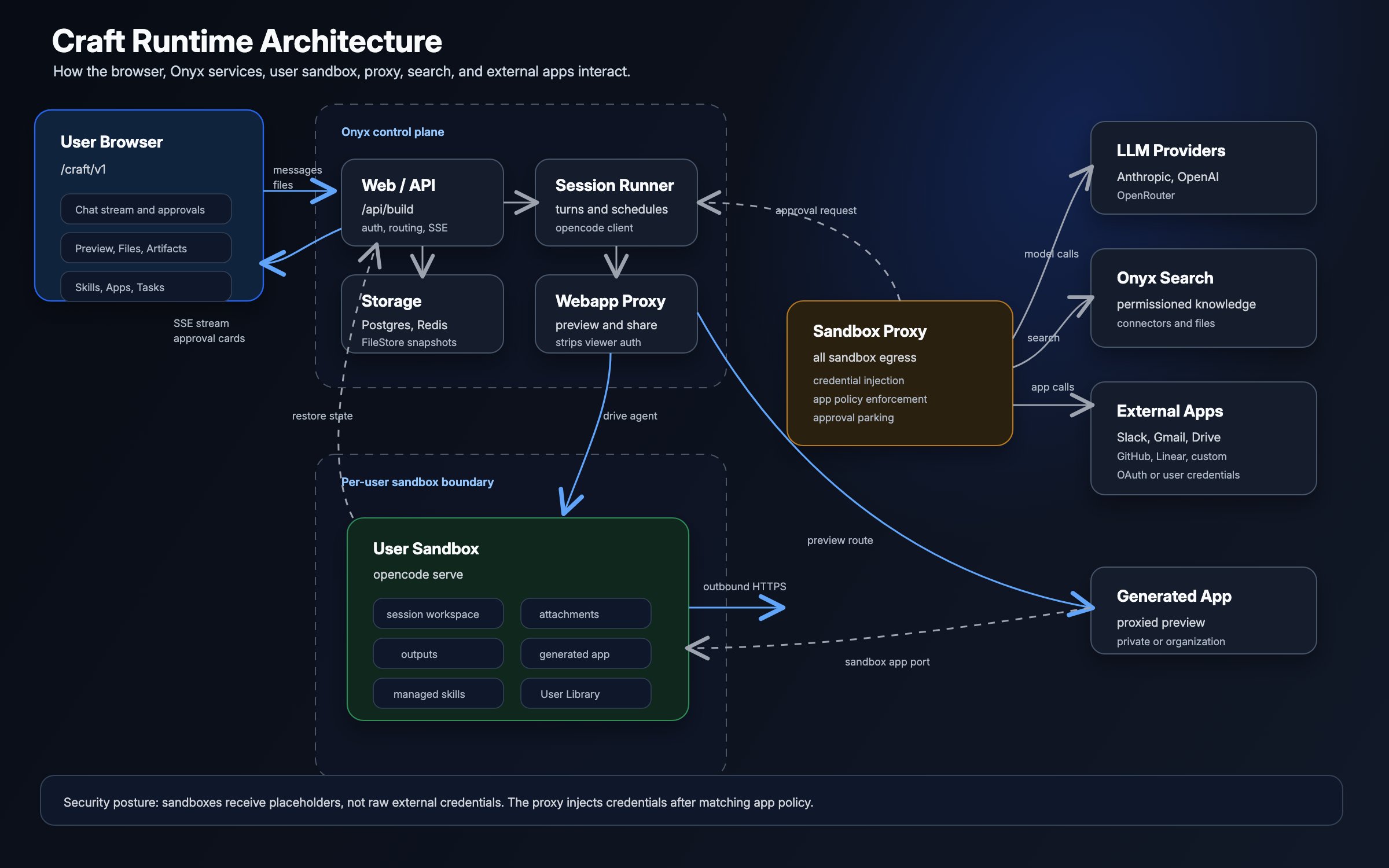
Components and trust boundaries
The sandbox is the untrusted boundary. It receives the files and instructions needed to complete work, but not raw Onyx,
model-provider, or App credentials.
Request lifecycle
1
Onyx authorizes the request
The browser sends the prompt, attachments, model choice, and selected capabilities to the Onyx API.
Onyx checks the user’s Craft and model access.
2
Onyx prepares the workspace
Onyx creates or restores the user’s sandbox, creates a directory for the session,
and synchronizes the Skills and User Library files available to that user.
3
The agent runs in the sandbox
The sandbox calls the selected model, runs code and tools, and writes files into the session workspace.
Onyx streams agent events back to the browser.
4
Network requests pass through the proxy
The sandbox proxy identifies the sandbox and session, blocks internal destinations,
and injects credentials or requests approval when the destination requires it.
5
Onyx serves the result
Users inspect and download files through authenticated Onyx APIs.
Onyx proxies generated web apps from the sandbox after checking the app’s sharing scope.
Sandbox and workspace isolation
Craft maintains one sandbox per user and a separate workspace for each session. The workspace contains attachments, generated code, intermediate files, outputs, and the session’s agent instructions. Skills and User Library files are synchronized into a managed area of the sandbox and linked into each session. Attachments belong only to their session, while User Library files remain available across the user’s sessions. Skill bundles can contain executable scripts, so they should be reviewed as code before being shared. When a sandbox becomes idle, Onyx snapshots its session state to the configured file store and stops the runtime. Onyx restores that state when the user returns. Snapshots support sleep and restore; they are not user-facing version history.
The Docker backend requires read-write Docker socket access from the API server and background worker.
This access is effectively root access to the host,
which is why Docker Compose is intended for small deployments on a trusted host.
Network egress
The sandbox firewall permits DNS and the sandbox proxy path. Sandbox HTTP and HTTPS requests do not have a second, direct route to the network. The proxy applies different behavior based on the destination:The proxy is an egress control and credential boundary, not a public-internet allowlist.
Craft can browse websites and install packages from public destinations without an App connection.
Credential handling
The sandbox receives placeholder values for credentials that Onyx manages. The proxy resolves the sandbox identity, retrieves the correct credential, and adds it only to a matching outbound request.
Raw credentials exist in Onyx-controlled storage and briefly in proxy memory while a request is prepared.
They are not written into the sandbox workspace, Skill bundle, or generated files by the injection process.
Company knowledge
Craft searches company knowledge through the Onyx API rather than connecting the sandbox directly to the vector database or indexed sources. Onyx evaluates the request as the sandbox owner and applies that user’s document permissions. Enabling Craft, sharing a Skill, or connecting an App does not expand the user’s indexed document access. Search results can still become part of a prompt, generated file, or web app, so users must review outputs before sharing them.Apps and approvals
Requests attributed to an App use the policies configured by an Admin:
For an Ask action, the approval flow is:
1
Park the request
The proxy stops the request before injecting App credentials.
2
Request a decision
Onyx sends an approval card to the session. The user approves once, approves matching actions for the session,
or rejects the request.
3
Forward or block
The proxy forwards an approved request with credentials, or fails the request closed after rejection or expiry.
Generated web apps
Onyx serves generated web apps through an authenticated proxy instead of exposing sandbox ports directly. The proxy checks the session’s sharing scope before forwarding a request:
Sharing exposes the generated web app, not the Craft conversation or the session’s file browser. However,
information written into the app itself is visible to everyone who can open it.
Before sending a request to the generated app server, the proxy removes the viewer’s cookies, authorization headers,
CSRF headers, forwarding headers, and identity headers. It also strips
set-cookie from the generated app’s response.
The preview runs in a sandboxed iframe, with scripts, forms, and user-initiated navigation enabled.
State and operational data
Security considerations
Deploying Craft
Choose a sandbox backend and configure its security controls.
Managing Craft
Configure access, Apps, Skills, models, and workspace instructions.