> ## Documentation Index
> Fetch the complete documentation index at: https://docs.okeanai.ru/llms.txt
> Use this file to discover all available pages before exploring further.
# Craft Architecture
> Understand Craft isolation, data flows, credentials, approvals, and sharing
Craft adds an untrusted code-execution environment to Onyx. Onyx controls the sandbox lifecycle,
keeps credentials outside the sandbox, and mediates access to company knowledge, external services,
and generated web apps.
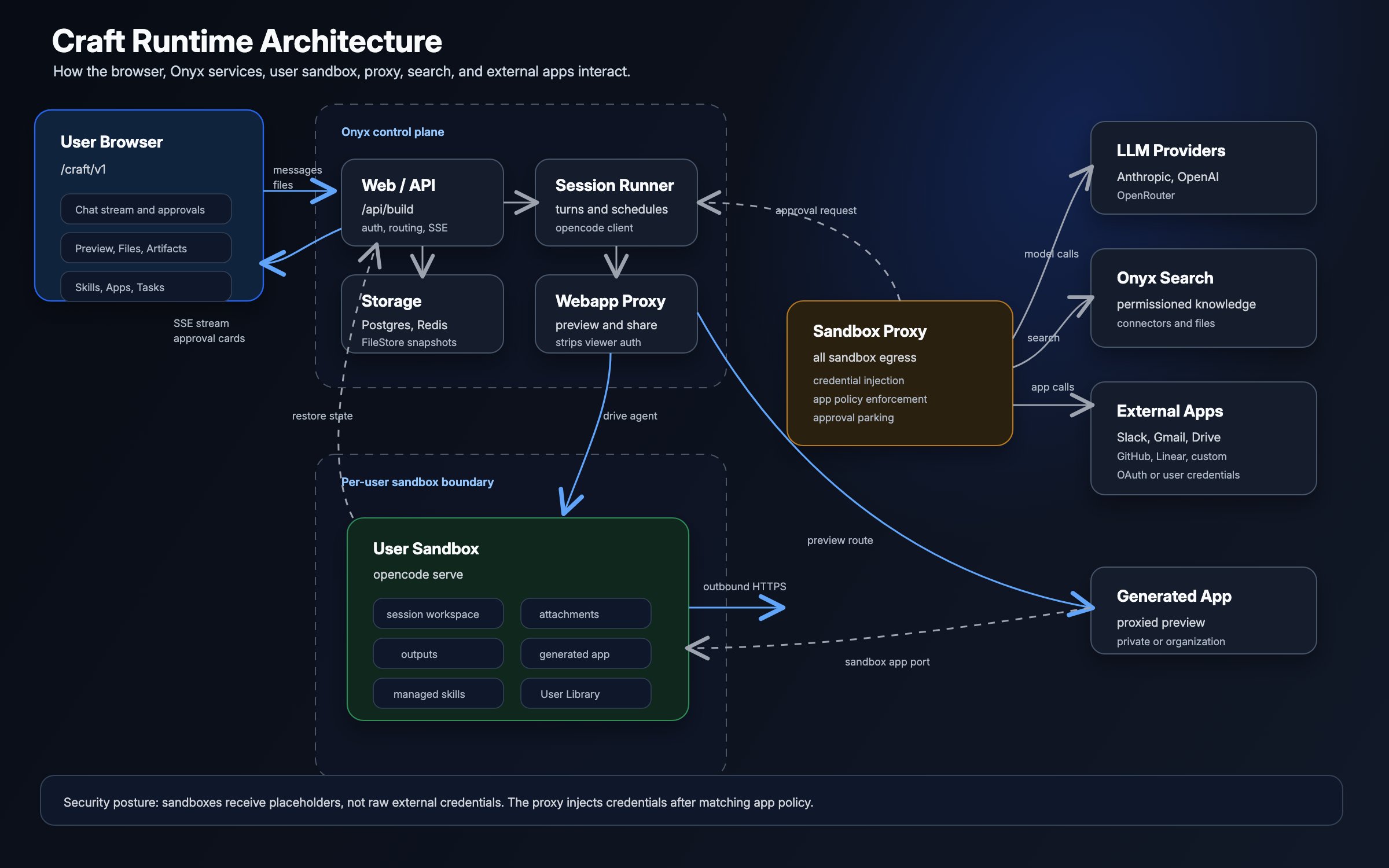 ## Components and trust boundaries
| Component | Role and access |
| ---------------------- | ---------------------------------------------------------------------------------------------------------------------- |
| **Browser** | Sends prompts and files, receives the event stream, shows approvals, and renders generated web apps. |
| **Onyx control plane** | Authenticates users, checks access, manages sessions and sandboxes, stores state, and proxies generated web apps. |
| **Per-user sandbox** | Runs model-generated code and tools. Each Craft session has a separate workspace inside the user's sandbox. |
| **Sandbox proxy** | Receives sandbox HTTP and HTTPS traffic, blocks internal destinations, injects credentials, and enforces App policies. |
| **Onyx storage** | Stores session records, approvals, tasks, encrypted credentials, uploaded files, Skill bundles, and snapshots. |
| **External services** | Model providers, public websites, and configured Apps receive outbound requests through the sandbox proxy. |
The sandbox is the untrusted boundary. It receives the files and instructions needed to complete work, but not raw Onyx,
model-provider, or App credentials.
## Request lifecycle
The browser sends the prompt, attachments, model choice, and selected capabilities to the Onyx API.
Onyx checks the user's Craft and model access.
Onyx creates or restores the user's sandbox, creates a directory for the session,
and synchronizes the Skills and User Library files available to that user.
The sandbox calls the selected model, runs code and tools, and writes files into the session workspace.
Onyx streams agent events back to the browser.
The sandbox proxy identifies the sandbox and session, blocks internal destinations,
and injects credentials or requests approval when the destination requires it.
Users inspect and download files through authenticated Onyx APIs.
Onyx proxies generated web apps from the sandbox after checking the app's sharing scope.
## Sandbox and workspace isolation
Craft maintains one sandbox per user and a separate workspace for each session. The workspace contains attachments,
generated code, intermediate files, outputs, and the session's agent instructions.
Skills and User Library files are synchronized into a managed area of the sandbox and linked into each session.
Attachments belong only to their session, while User Library files remain available across the user's sessions.
Skill bundles can contain executable scripts, so they should be reviewed as code before being shared.
When a sandbox becomes idle, Onyx snapshots its session state to the configured file store and stops the runtime.
Onyx restores that state when the user returns. Snapshots support sleep and restore;
they are not user-facing version history.
| Backend | Isolation boundary |
| ------------------ | -------------------------------------------------------------------------------------------------------------------------- |
| **Kubernetes** | A sandbox pod in a dedicated namespace, with scoped RBAC, an in-pod firewall, and NetworkPolicies. |
| **Docker Compose** | A sandbox container on a dedicated bridge, with an in-container firewall and no connection to the default Compose network. |
The Docker backend requires read-write Docker socket access from the API server and background worker.
This access is effectively root access to the host,
which is why Docker Compose is intended for small deployments on a trusted host.
## Network egress
The sandbox firewall permits DNS and the sandbox proxy path. Sandbox HTTP and HTTPS requests do not have a second,
direct route to the network.
The proxy applies different behavior based on the destination:
| Destination | Proxy behavior |
| ------------------------------------- | --------------------------------------------------------------------------------------------------------------------------------------------- |
| **Onyx API** | Allows the configured API host and port and injects the sandbox's scoped Onyx credential. |
| **Supported model provider** | Injects an accessible provider key for Anthropic, OpenAI, or OpenRouter. |
| **Configured App** | Matches the URL and action, applies its policy, then injects organization or user credentials. |
| **Other public destination** | Forwards the request without privileged credentials or an App approval. |
| **Private or non-global destination** | Blocks the request, including loopback, private networks, link-local addresses, and cloud metadata. The configured Onyx API is the exception. |
The proxy is an egress control and credential boundary, not a public-internet allowlist.
Craft can browse websites and install packages from public destinations without an App connection.
Kubernetes adds NetworkPolicies as a second control around sandbox-to-proxy and DNS traffic.
Docker sandboxes use a dedicated bridge that cannot resolve or reach Onyx's Compose services by name.
See the [Kubernetes](/deployment/local/craft_kubernetes) and [Docker Compose](/deployment/local/craft_docker_compose)
deployment guides for operator requirements.
## Credential handling
The sandbox receives placeholder values for credentials that Onyx manages. The proxy resolves the sandbox identity,
retrieves the correct credential, and adds it only to a matching outbound request.
| Credential | Stored by Onyx | Injected for |
| --------------------------- | --------------------------------------------------------- | ------------------------------------------ |
| **Onyx sandbox credential** | Encrypted with the sandbox record | The configured Onyx API host and port |
| **Model provider key** | With the user's accessible provider configuration | The matching supported model-provider host |
| **App credential** | Encrypted organization or per-user App credential storage | URLs attributed to that App |
Raw credentials exist in Onyx-controlled storage and briefly in proxy memory while a request is prepared.
They are not written into the sandbox workspace, Skill bundle, or generated files by the injection process.
## Company knowledge
Craft searches company knowledge through the Onyx API rather than connecting the sandbox directly to the vector database
or indexed sources. Onyx evaluates the request as the sandbox owner and applies that user's document permissions.
Enabling Craft, sharing a Skill, or connecting an App does not expand the user's indexed document access.
Search results can still become part of a prompt, generated file, or web app,
so users must review outputs before sharing them.
## Apps and approvals
Requests attributed to an App use the policies configured by an Admin:
| Policy | Enforcement |
| ---------------- | ------------------------------------------------------------------ |
| **Auto-approve** | The proxy forwards the matched action without pausing. |
| **Ask** | The proxy parks the request until the user approves or rejects it. |
| **Deny** | The proxy blocks the request. |
For an **Ask** action, the approval flow is:
The proxy stops the request before injecting App credentials.
Onyx sends an approval card to the session. The user approves once, approves matching actions for the session,
or rejects the request.
The proxy forwards an approved request with credentials, or fails the request closed after rejection or expiry.
If a request matches multiple built-in App actions, the strictest policy wins: **Deny**, then **Ask**,
then **Auto-approve**. An uncataloged request to a built-in App falls back to **Ask**.
Custom Apps use **Ask** for every request matching their configured URL patterns.
Scheduled Tasks have no user present to answer an approval. A task owner can pre-approve an App for that task;
this permits the App's **Ask** actions during the run.
Pre-approval does not override **Deny** and applies to the whole App, not one action.
## Generated web apps
Onyx serves generated web apps through an authenticated proxy instead of exposing sandbox ports directly.
The proxy checks the session's sharing scope before forwarding a request:
| Scope | Access |
| ---------------- | ----------------------------------------- |
| **Private** | Session owner only |
| **Organization** | Authenticated users in the Onyx workspace |
Sharing exposes the generated web app, not the Craft conversation or the session's file browser. However,
information written into the app itself is visible to everyone who can open it.
Before sending a request to the generated app server, the proxy removes the viewer's cookies, authorization headers,
CSRF headers, forwarding headers, and identity headers. It also strips `set-cookie` from the generated app's response.
The preview runs in a sandboxed iframe, with scripts, forms, and user-initiated navigation enabled.
Generated client-side code runs in the viewer's browser.
Browser-side requests are not sandbox egress and do not pass through the sandbox proxy.
Review a generated app before sharing it with the organization.
## State and operational data
| Store | Craft data |
| -------------------------- | -------------------------------------------------------------------------------------------------------- |
| **PostgreSQL** | Sessions, sandbox records, sharing state, approvals, App configuration, tasks, and encrypted credentials |
| **Redis** | Streaming coordination, approval signaling, locks, and short-lived caches |
| **File store** | Attachments, User Library content, Skill bundles, and sandbox snapshots |
| **Active sandbox storage** | Session workspaces, generated files, agent state, and running web apps |
Treat Craft logs and traces as potentially sensitive. Depending on logging configuration, they can include prompts,
file names, URLs, tool results, model interactions, and approval metadata.
## Security considerations
| Risk | Mitigation |
| ------------------------------------------------- | ------------------------------------------------------------------------------------------------------------- |
| Model-generated code behaves unexpectedly | Keep the sandbox boundary and proxy controls intact; review outputs before using or sharing them. |
| A Skill contains unsafe instructions or scripts | Review custom Skill bundles before granting broader access. |
| A user approves an unintended App action | Keep consequential actions on **Ask** or **Deny** and make Scheduled Task pre-approvals narrow. |
| Generated content includes sensitive company data | Document permissions protect retrieval, but users remain responsible for generated files and shared web apps. |
| Prompts and context leave Onyx | Review the data handling terms and configuration of each model provider and external App. |
| Docker socket compromise affects the host | Use Kubernetes for broader deployments and restrict Docker Compose to trusted, controlled hosts. |
Choose a sandbox backend and configure its security controls.
Configure access, Apps, Skills, models, and workspace instructions.
## Components and trust boundaries
| Component | Role and access |
| ---------------------- | ---------------------------------------------------------------------------------------------------------------------- |
| **Browser** | Sends prompts and files, receives the event stream, shows approvals, and renders generated web apps. |
| **Onyx control plane** | Authenticates users, checks access, manages sessions and sandboxes, stores state, and proxies generated web apps. |
| **Per-user sandbox** | Runs model-generated code and tools. Each Craft session has a separate workspace inside the user's sandbox. |
| **Sandbox proxy** | Receives sandbox HTTP and HTTPS traffic, blocks internal destinations, injects credentials, and enforces App policies. |
| **Onyx storage** | Stores session records, approvals, tasks, encrypted credentials, uploaded files, Skill bundles, and snapshots. |
| **External services** | Model providers, public websites, and configured Apps receive outbound requests through the sandbox proxy. |
The sandbox is the untrusted boundary. It receives the files and instructions needed to complete work, but not raw Onyx,
model-provider, or App credentials.
## Request lifecycle
The browser sends the prompt, attachments, model choice, and selected capabilities to the Onyx API.
Onyx checks the user's Craft and model access.
Onyx creates or restores the user's sandbox, creates a directory for the session,
and synchronizes the Skills and User Library files available to that user.
The sandbox calls the selected model, runs code and tools, and writes files into the session workspace.
Onyx streams agent events back to the browser.
The sandbox proxy identifies the sandbox and session, blocks internal destinations,
and injects credentials or requests approval when the destination requires it.
Users inspect and download files through authenticated Onyx APIs.
Onyx proxies generated web apps from the sandbox after checking the app's sharing scope.
## Sandbox and workspace isolation
Craft maintains one sandbox per user and a separate workspace for each session. The workspace contains attachments,
generated code, intermediate files, outputs, and the session's agent instructions.
Skills and User Library files are synchronized into a managed area of the sandbox and linked into each session.
Attachments belong only to their session, while User Library files remain available across the user's sessions.
Skill bundles can contain executable scripts, so they should be reviewed as code before being shared.
When a sandbox becomes idle, Onyx snapshots its session state to the configured file store and stops the runtime.
Onyx restores that state when the user returns. Snapshots support sleep and restore;
they are not user-facing version history.
| Backend | Isolation boundary |
| ------------------ | -------------------------------------------------------------------------------------------------------------------------- |
| **Kubernetes** | A sandbox pod in a dedicated namespace, with scoped RBAC, an in-pod firewall, and NetworkPolicies. |
| **Docker Compose** | A sandbox container on a dedicated bridge, with an in-container firewall and no connection to the default Compose network. |
The Docker backend requires read-write Docker socket access from the API server and background worker.
This access is effectively root access to the host,
which is why Docker Compose is intended for small deployments on a trusted host.
## Network egress
The sandbox firewall permits DNS and the sandbox proxy path. Sandbox HTTP and HTTPS requests do not have a second,
direct route to the network.
The proxy applies different behavior based on the destination:
| Destination | Proxy behavior |
| ------------------------------------- | --------------------------------------------------------------------------------------------------------------------------------------------- |
| **Onyx API** | Allows the configured API host and port and injects the sandbox's scoped Onyx credential. |
| **Supported model provider** | Injects an accessible provider key for Anthropic, OpenAI, or OpenRouter. |
| **Configured App** | Matches the URL and action, applies its policy, then injects organization or user credentials. |
| **Other public destination** | Forwards the request without privileged credentials or an App approval. |
| **Private or non-global destination** | Blocks the request, including loopback, private networks, link-local addresses, and cloud metadata. The configured Onyx API is the exception. |
The proxy is an egress control and credential boundary, not a public-internet allowlist.
Craft can browse websites and install packages from public destinations without an App connection.
Kubernetes adds NetworkPolicies as a second control around sandbox-to-proxy and DNS traffic.
Docker sandboxes use a dedicated bridge that cannot resolve or reach Onyx's Compose services by name.
See the [Kubernetes](/deployment/local/craft_kubernetes) and [Docker Compose](/deployment/local/craft_docker_compose)
deployment guides for operator requirements.
## Credential handling
The sandbox receives placeholder values for credentials that Onyx manages. The proxy resolves the sandbox identity,
retrieves the correct credential, and adds it only to a matching outbound request.
| Credential | Stored by Onyx | Injected for |
| --------------------------- | --------------------------------------------------------- | ------------------------------------------ |
| **Onyx sandbox credential** | Encrypted with the sandbox record | The configured Onyx API host and port |
| **Model provider key** | With the user's accessible provider configuration | The matching supported model-provider host |
| **App credential** | Encrypted organization or per-user App credential storage | URLs attributed to that App |
Raw credentials exist in Onyx-controlled storage and briefly in proxy memory while a request is prepared.
They are not written into the sandbox workspace, Skill bundle, or generated files by the injection process.
## Company knowledge
Craft searches company knowledge through the Onyx API rather than connecting the sandbox directly to the vector database
or indexed sources. Onyx evaluates the request as the sandbox owner and applies that user's document permissions.
Enabling Craft, sharing a Skill, or connecting an App does not expand the user's indexed document access.
Search results can still become part of a prompt, generated file, or web app,
so users must review outputs before sharing them.
## Apps and approvals
Requests attributed to an App use the policies configured by an Admin:
| Policy | Enforcement |
| ---------------- | ------------------------------------------------------------------ |
| **Auto-approve** | The proxy forwards the matched action without pausing. |
| **Ask** | The proxy parks the request until the user approves or rejects it. |
| **Deny** | The proxy blocks the request. |
For an **Ask** action, the approval flow is:
The proxy stops the request before injecting App credentials.
Onyx sends an approval card to the session. The user approves once, approves matching actions for the session,
or rejects the request.
The proxy forwards an approved request with credentials, or fails the request closed after rejection or expiry.
If a request matches multiple built-in App actions, the strictest policy wins: **Deny**, then **Ask**,
then **Auto-approve**. An uncataloged request to a built-in App falls back to **Ask**.
Custom Apps use **Ask** for every request matching their configured URL patterns.
Scheduled Tasks have no user present to answer an approval. A task owner can pre-approve an App for that task;
this permits the App's **Ask** actions during the run.
Pre-approval does not override **Deny** and applies to the whole App, not one action.
## Generated web apps
Onyx serves generated web apps through an authenticated proxy instead of exposing sandbox ports directly.
The proxy checks the session's sharing scope before forwarding a request:
| Scope | Access |
| ---------------- | ----------------------------------------- |
| **Private** | Session owner only |
| **Organization** | Authenticated users in the Onyx workspace |
Sharing exposes the generated web app, not the Craft conversation or the session's file browser. However,
information written into the app itself is visible to everyone who can open it.
Before sending a request to the generated app server, the proxy removes the viewer's cookies, authorization headers,
CSRF headers, forwarding headers, and identity headers. It also strips `set-cookie` from the generated app's response.
The preview runs in a sandboxed iframe, with scripts, forms, and user-initiated navigation enabled.
Generated client-side code runs in the viewer's browser.
Browser-side requests are not sandbox egress and do not pass through the sandbox proxy.
Review a generated app before sharing it with the organization.
## State and operational data
| Store | Craft data |
| -------------------------- | -------------------------------------------------------------------------------------------------------- |
| **PostgreSQL** | Sessions, sandbox records, sharing state, approvals, App configuration, tasks, and encrypted credentials |
| **Redis** | Streaming coordination, approval signaling, locks, and short-lived caches |
| **File store** | Attachments, User Library content, Skill bundles, and sandbox snapshots |
| **Active sandbox storage** | Session workspaces, generated files, agent state, and running web apps |
Treat Craft logs and traces as potentially sensitive. Depending on logging configuration, they can include prompts,
file names, URLs, tool results, model interactions, and approval metadata.
## Security considerations
| Risk | Mitigation |
| ------------------------------------------------- | ------------------------------------------------------------------------------------------------------------- |
| Model-generated code behaves unexpectedly | Keep the sandbox boundary and proxy controls intact; review outputs before using or sharing them. |
| A Skill contains unsafe instructions or scripts | Review custom Skill bundles before granting broader access. |
| A user approves an unintended App action | Keep consequential actions on **Ask** or **Deny** and make Scheduled Task pre-approvals narrow. |
| Generated content includes sensitive company data | Document permissions protect retrieval, but users remain responsible for generated files and shared web apps. |
| Prompts and context leave Onyx | Review the data handling terms and configuration of each model provider and external App. |
| Docker socket compromise affects the host | Use Kubernetes for broader deployments and restrict Docker Compose to trusted, controlled hosts. |
Choose a sandbox backend and configure its security controls.
Configure access, Apps, Skills, models, and workspace instructions.